RyanReasons.com Security Validation
External, origin, and segmentation testing across three security passes and two vantage points.
When I finished putting this site online, I had a pretty simple problem. I knew exactly how I had built it, and basically it was that internet traffic should be hitting Cloudflare, proceed by entering my network through a Cloudflare Tunnel, reach my Nginx web server on a loopback address, and stop right there.
Nginx should not be sitting on a normal network interface whatsoever waiting for somebody to find it, and the DMZ should not be able to wander into any of my management or internal services. Basically the site itself should expose almost nothing beyond static HTML, CSS, images, fonts, and a résumé.
That was the intended configuration and what I intended as I worked through every step.
But as always, there was this lingering thought in the back of my head and basically I HAD to know what it actually did regardless of what I configured.
Could it actually hold up to what was intended?
So instead of calling the site acceptable for my standards because the firewall rules looked right and nginx.conf always looked proper, I spent three passes trying to reach it through different paths that were not supposed to work.
A lot of them failed.
Which is obviously what I wanted.
What became much more interesting was trying to prove why they failed.
Security Receipt
| Claim | Result |
|---|---|
| Public DNS exposes the origin | Not detected |
| Direct web access to the origin | Blocked |
| Nginx externally bound | No, loopback only |
| Cloudflare Tunnel | Outbound only |
| Executable client-side JavaScript | None |
| Advertising/behavioral analytics | None |
| Tracking cookies | None |
| Public HSTS | 365 days |
| Sensitive deployment artifact exposure | Remediated |
| DMZ to Management | Confirmed policy enforcement |
| DMZ to Internal Services | Confirmed policy enforcement |
| DMZ to Gateway Administration | Inconclusive |
| Critical findings | 0 |
| High findings | 0 |
| Medium findings | 0 |
| Low findings | 0 |
The last gray result is intentional, and even though I could probably or even “technically” make the table look prettier by calling it a pass, I simply didn’t have the evidence to actually do that.
So it stayed gray.
Testing Goals
I wasn't really interested in answering:
Is my website secure?
I don't think that question has a very useful yes-or-no answer, and I truly believe in the quote often associated with Salman Rushdie:
“There is no such thing as perfect security, only varying levels of insecurity.”
What I was really looking for were much smaller claims that could actually be proved and were actionable, at least from someone with a similar skillset to mine.
A few examples were:
- Can somebody on the Internet find my actual origin behind Cloudflare?
- If someone somehow already knows the origin, can they connect directly to the web server anyway regardless of what is in place?
- Is Nginx actually limited to loopback, or is a firewall simply hiding a bad listener?
- Does the DMZ really stop at the boundaries I created, or are those boundaries actually somewhere else?
- If a connection times out, can I prove which control was actually responsible for stopping it?
All of the questions were important in my mind, but that last one ended up becoming much more important than I originally thought.
Because a timeout by itself does not really tell me much.
Something failed.
Okay.
Why?
Pass 1 — External Testing
I figured that since I was actually out of town and not at my house when I made this website live, the first pass should happen from an external network with my WireGuard tunnel completely disconnected.
I wanted the view somebody on the public Internet would have, which is much more valuable than a scan that accidentally had a route back into my own lab.
Before doing anything else, I confirmed WireGuard was not active, there were no routes back into my home network, and I was actually working from the external connection.
From there I started looking at what the public side of the website exposed.
The apex domain and www resolved to Cloudflare. The site behaved like a static application. Older TLS versions were rejected. The CSP was restrictive. There was no executable client-side JavaScript being served by the actual site. The crawl did not turn up forms, APIs, directory listings, credentials, private addresses, GPS metadata, or an obvious origin address.
Basically all the “juicy stuff” I did not want sitting out there was not showing up.
The assessment ended with:
Which “looks” great.
But honestly, it also doesn't prove nearly as much as those four zeros make it look like it proves.
Overall the external assessment could tell me that everything I saw was consistent with the architecture I actually planned, configured, and built:
Internet
   ↓
Cloudflare
   ↓
Cloudflare Tunnel
   ↓
Private Nginx
But it could not prove that the tunnel actually existed.
It could not prove that Nginx was actually private.
It could not prove that I hadn’t accidentally exposed another path that simply was not showing up.
The public side basically told me:
“I can't find your origin.”
That is good.
But “I can't find it” and “it cannot be directly reached” are two entirely different statements that really shouldn’t be confused. Even the first pass had to treat the Cloudflare Tunnel and private Nginx architecture as something consistent with the evidence instead of something it could prove from the Internet alone.
So I changed the question.
Instead of me asking:
Can I discover the actual origin?
it slowly developed into:
What happens if I stop pretending the origin is secret and test it while already knowing exactly where it is?
That became Pass 2.
Pass 2 — Origin Validation
For the second pass I reconnected through my fine-grained WireGuard administration path that I created specifically for this trip with minimal permissions.
At this point there really wasn't any mystery left, because….well I am the one who stood everything up, but also because of the results from the last pass.
I knew what VM hosted the site.
I knew what network it was on.
I knew how traffic was supposed to reach it.
Basically I removed the advantage of the origin being hidden and started asking whether the architecture could still protect itself if that information was already known from the start.
The actual path I intended looked like this:
Internet
   ↓
Cloudflare
   ↓
Outbound Cloudflare Tunnel
   ↓
cloudflared on web-dmz-01
   ↓
127.0.0.1:8080
   ↓
Nginx
   ↓
Static website files
The origin side state matched what I was already expecting walking into all of this which was that Cloudflared had four outbound QUIC connections established.
The tunnel sent ryanreasons.com and www.ryanreasons.com to 127.0.0.1:8080 and then ended with a catch all 404.
Nginx only had listeners on:
127.0.0.1:8080 and [::1]:8080
and there was no normal TCP 80 or TCP 443 listener sitting on the VM waiting for connections, which that all looked right but again, that was configuration, so now I wanted traffic.
TCP Port Validation
One of the first things I wanted was a complete TCP view of the VM, and initially I actually tried doing a full Nmap scan from Windows and I’m sure as most people could imagine……it basically just sat there…..then sat there some more, and a bounded retry eventually reached its ten minute timeout.
So it would have been less than ideal for me to sit there and think to myself:
“Well, I guess nothing is responding.”
But that really bothered me because I knew that wasn’t right whatsoever and on top of that the scan didn't prove all the ports were filtered, and honestly it really only proved that the scan didn't finish.
So I didn't use either one as evidence.
I moved the full TCP inventory into WSL and instead used a bounded TCP connect process with one attempt per port, no retries, a defined timeout, and a capped rate so the results actually had a beginning and an end instead of the equivalent of me just twiddling my thumbs.
This time the complete 1–65535 TCP inventory finished.
The result:
The single reachable service was SSH on TCP/22.
The web ports I actually cared about came back as:
22/tcp    open       ssh
80/tcp    filtered   http
443/tcp   filtered   https
8080/tcp  filtered   http-proxy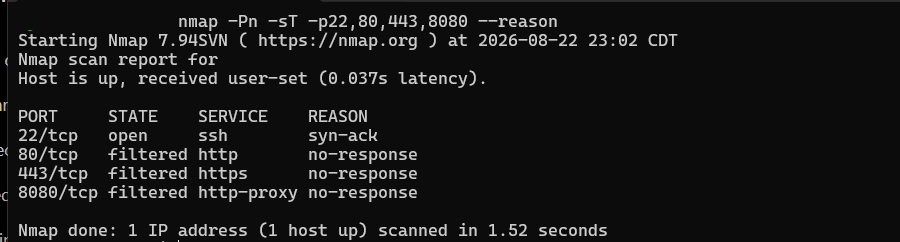
To me the interesting part wasn't that WSL worked and Windows didn't, and I REALLY don't care about turning this into a Windows versus Linux argument because that’s a losing argument regardless of which way you take it. The part I cared about was that I didn't trust a measurement that never actually completed.
If a tool gives me nothing that is truly usable, I really don't believe that “nothing” should somehow translate into evidence just because the answer happens to agree with what I wanted. Times like these are why I typically move the goal post for so many projects sadly.
Nginx Listener Validation
From the WireGuard side, TCP/8080 timed out, Check.
That's of course exactly what I wanted, but I kept thinking about the same problem.
What actually caused it?
For example, these two situations could look almost identical from another machine:
Nginx listening on 0.0.0.0:8080
+
firewall drops the connection
or:
Nginx isn't listening on that interface at allBoth can result in me sitting at another machine staring at a failed connection which of course those are not the same security state.
If I accidentally configured Nginx to listen on every interface, I don't want to congratulate myself because the firewall happened to hide the mistake, because if the firewall is the only thing hiding an accidental listener, then I have a second problem sitting behind the first control.
So I stopped looking at it from the outside for a few moments and checked the machine itself.
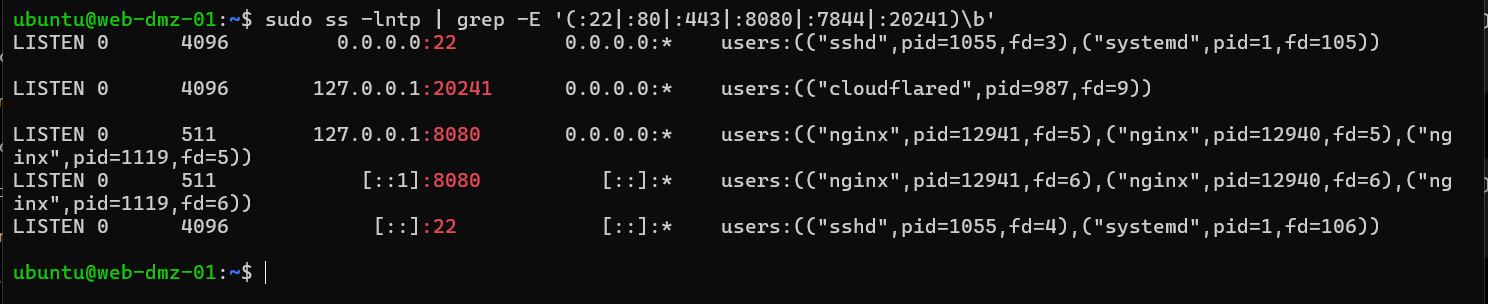
The listener inventory showed:
0.0.0.0:22          sshd
[::]:22              sshd

127.0.0.1:8080       nginx
[::1]:8080            nginx

127.0.0.1:20241      cloudflared
There was no Nginx listener on the VM's normal IPv4 address.
There was no Nginx listener on its non-loopback IPv6 address.
There was no Nginx listener on TCP 80.
There was no Nginx listener on TCP 443.
Then I tested both loopback stacks directly.
IPv4:
127.0.0.1:8080 → HTTP 200IPv6:
[::1]:8080 → HTTP 200Now I actually had something that I trusted much more than the previous state.
Nginx was alive.
Nginx worked.
It just wasn't listening where another machine could directly reach it which is absolutely different than saying that my port 8080 timed out.
Cloudflare Tunnel Validation
I basically applied the same thought process to Cloudflared, and it solidifies the entire reason I like Cloudflare Tunnel for this particular use is that the VM establishes the connection outward. It keeps me from having to expose another public listener just to make the tunnel function, so naturally I wanted to check that as well.
Cloudflared was active and enabled and its metrics endpoint was bound only to loopback on TCP/20241.
There were four outbound UDP/QUIC sockets associated with Cloudflared, and there was no inbound Cloudflared listener sitting on TCP 80, 443, or 7844.
Again, what I had drawn on paper and what the machine was actually doing appeared to match seamlessly.
- • cloudflared active
- • cloudflared enabled
-
•
metrics endpoint on
127.0.0.1:20241 - • four outbound UDP/QUIC sockets
- • no inbound Cloudflared listener on TCP 80, 443, or 7844
At this point I had much more than:
“I think the site is behind a tunnel.”
I had the public side showing Cloudflare.
I had the origin showing the actual outbound Cloudflared sessions.
I also had Cloudflared routing to loopback, while Nginx was bound to loopback, and I actually had direct attempts against the origin's web ports failing. So now the architecture was starting to truly become something I could actually prove from more than one angle.
Pass 2 Finding: Public _headers Artifact
This is probably one of my favorite parts of the entire process because it is also where the original assessment proved itself incomplete.
Pass 1 did not find any unexpected public deployment files whereas pass 2 did, I found a file sitting at /_headers and when I decided to publicly test it the return was:
HTTP 200It was only an 845-byte deployment artifact and overall nothing juicy was inside and nothing that would give someone else a path into my server that I was able to see. So my personal opinion is that from a severity standpoint this was not some huge vulnerability, it was really just information but with that being said information chained with other information can be very powerful so it absolutely should not have been publicly accessible.
And even more importantly, it meant my earlier statement that there were no unexpected public files was simply not completely true, so naturally I corrected it.
During pass 1 I seemed to have missed something and to me that made a third pass automatically necessary.
Pass 3 — Remediation and Retesting
I could have SSH'd into the VM, deleted _headers, checked the URL again, saw a 404, and called it fixed.
That would have technically fixed the current copy.
It would not have stopped the next deployment from putting it right back because of the simple script I created thus I didn't want the remediation to just be:
rm _headersand move on.
A new immutable release was created from the previous release.
_headers was removed from the new one, while the local release process was changed so _headers would be excluded actually going forward, and then I proceeded by adding an exact Nginx rule so that even if the file somehow ended up in a future deployment anyway, requesting /_headers would still return a 404. Basically I fixed the deployment problem and then put another control in front of the same mistake because at this point better safe than sorry. While I was already there, I also cleaned up the generic Nginx 404 behavior, reused my actual custom 404 page, and decided that it was best to turn server_tokens off globally.
Afterward:
/_headers → HTTP 404and:
random nonexistent page → HTTP 404
The rest of the release was also compared back against the previous version so I could make sure fixing a tiny deployment artifact didn't quietly alter a bunch of unrelated website files. I’ve had simple changes create irritating side effects before, and in this case nothing else changed. To me that mattered more than just seeing the 404.
Segmentation Validation
The final part of this wasn't really about the website anymore, and it was at this point more about what happens after the web VM, mostly due to the fact that the VM is in a DMZ. That DMZ is specifically not supposed to become a convenient stepping stone into the rest of the environment if the web server ever does get compromised because anything is possible.
Thus this is why I wanted to test three paths:
DMZ → Management

DMZ → Internal Services

DMZ → Gateway Administration
I already had firewall policies saying those paths should be blocked, but by this point I was getting pretty tired of using configuration as proof of…..well just that…..configuration.
So I tried my best to prove them with traffic so before actually testing the deny itself, I first made sure the destination on the other side was actually alive and I was able to verify that the Proxmox management service on TCP/8006 was live, that the gateway HTTPS/API service was live, that the internal Jellyfin service on TCP/8096 was live and there is something to take away from all the live checks which is that there is absolutely no pride in bragging about a firewall blocking a connection to a server that was already dead from the start.
Then I generated the connection attempts from the DMZ.
Management Segmentation Evidence
This is where things got slightly weird, mostly because the first management capture appeared to show my packet specifically because that sounds bad if I'm supposed to be proving segmentation right?
But there was another issue.
The capture had been performed on any. Which basically meant that first capture was useless for what I was actually trying to prove. It meant I could see the packet passing through a local tap/interface path, but I could not use that observation to prove the SYN actually reached the receiving management interface, so I chunked it out into the trash even though technically it looked like useful evidence but it didn’t prove what I was wanting to prove in this push. So I repeated the capture using the actual management receiving interface instead which dramatically changed things.
On the DMZ VM, the source capture showed the SYN leaving and the Proxmox service had already been independently proven alive and upon viewing the actual target management interface, the matching packet never appeared.
The current DMZ-to-Management blocking policy also matched the traffic which with that, it gave me enough to finally call it:
I repeated the same general idea against the internal services boundary.
Again:
The destination was live, and the SYN left the DMZ VM while the expected packet never reached the destination thus the applicable policy matched.
That one became:
as well.
One of the biggest things I took away from the entire project was actually that first packet capture in that it basically gave me an answer I wanted and I still decided to reject it. Mostly because if I can't explain exactly what the evidence truly proves, then the fact that I like the answer doesn't really matter.
Gateway Administration Test
Then there was the gateway administration test and this one truly bothered me because everything looked correct and the gateway administration service was proven alive. I sent the connection from the DMZ VM and the SYN left the source, the connection timed out, and the applicable DMZ to Gateway policy existed and should block the traffic, and basically every observable behavior lined up with the idea that the firewall did exactly what it was supposed to do.
But there was one problem.
I could not actually attribute that failure to the policy with the same level of evidence I had for the other two tests which did not sit well with me and honestly if you ask me at this exact moment in time it most likely still doesn’t….. (Putting a reminder in my phone to check when I get back to the house). The policy wasn't logging and I did not have the target side packet capture I needed for that particular path and on top of that I didn't have another counter or control point that could independently tell me that this exact firewall policy is the reason that exact packet did not make it through.
So I marked it:
INCONCLUSIVE
The other practical problem was that I was out of town while doing this and working through a deliberately narrow WireGuard administration path so naturally I couldn't just walk over ~450 miles to another system, plug into another network, or create whatever additional observation point I wanted.
I could have started changing production firewall logging just so I could turn the last gray box green.
I really didn't think that was necessary because it still wouldn’t make me feel better or honestly change the end result, and two of the three segmentation boundaries had already been independently confirmed, nothing about the gateway test actually indicated a failure, and the only thing I was missing was enough evidence to attribute the failure to the specific control.
So I didn't think that was enough of a reason to postpone publishing this, so the result stayed gray and as I said above I'll revisit it when I'm in a position where I can get the evidence I actually want.
Cloudflare RUM and HSTS
During Pass 3 I also noticed something that I did not intentionally deploy and have been against from the very beginning of planning this portfolio website. Cloudflare Browser Insights was injecting its Real User Measurement (RUM) JavaScript at the Cloudflare edge because I originally thought it would have to be an enabled switch before gaining that information but it was actually just the opposite of that.
That meant something interesting…..my actual immutable website release had no executable client side JavaScript in it, but a person visiting my website was still receiving JavaScript because Cloudflare was adding it afterward.
That distinction mattered to me because I wanted to put this statement directly on my homepage:
“This site is intentionally simple. What I mean by that is there are no advertising trackers, no behavioral analytics, no tracking cookies, and no client-side JavaScript.”
If Cloudflare is injecting analytics JavaScript after my origin returns the page, then from the visitor's point of view that statement isn't really true….it’s a flat out lie.
I don't care that it isn't inside my source files because the browser still gets it. So I disabled Cloudflare RUM and tested the public site again.
The final check returned:
BROWSER INSIGHTS:
DISABLED

EXECUTABLE CLIENT-SIDE JAVASCRIPT:
NOT PRESENT

JSON-LD:
PASS

CSP:
PASS

PUBLIC SITE:
PASS
I also changed the authoritative public HSTS setting from six months to one year which I decided for my particular use case was fine after research.
Afterward both:
ryanreasons.com
and:
www.ryanreasons.com
returned:
Strict-Transport-Security: max-age=31536000
without includeSubDomains or preload. At that point the statement on my homepage actually described what somebody's browser received instead of just describing what was sitting inside my webroot.
Evidence Review
By the time I finished this, I realized most of the useful parts didn't come from the clean results.
They came from the moments where something looked right and I decided I didn't trust it yet.
| What I Saw | Why I Didn't Accept It Yet | What I Did Instead |
|---|---|---|
| Public testing couldn't find the origin | Not finding something doesn't prove it can't be reached | Ran another pass already knowing the origin |
| Windows Nmap sat there without finishing | A stalled scan isn't evidence that every port is filtered | Repeated the inventory through WSL with defined limits |
| TCP/8080 timed out remotely | Could be a firewall or simply no service listening | Checked the actual bindings locally |
| First management PCAP showed the packet | Capturing on any didn't prove the receiving interface saw it |
Repeated the capture on the real target interface |
| Gateway connection timed out | Timeout did not identify the enforcing control | Left it INCONCLUSIVE |
| My source files contained no JavaScript | Cloudflare could still change what visitors received | Checked the public page and disabled the RUM injection |
That was probably the biggest change in how I looked at the whole thing.
A configuration file and a firewall policy are both basically assertions, while a timeout is an observation. None of those things automatically tell me why something happened.
Validated Claims
After all three passes, there are several things I feel comfortable actually saying about this release.
Public DNS doesn't expose an origin address that I was able to identify, while direct web access to the known origin through the tested IPv4 and IPv6 web ports does not work, and Nginx is actually bound only to IPv4 and IPv6 loopback on TCP/8080.
Cloudflared establishes outbound tunnel connectivity instead of exposing another inbound web listener.
The production webroot is static, root-owned, and not writable by the Nginx worker. No PHP, database server, Redis, Docker, Kubernetes, FTP, SMB, or NFS server was detected, and since this was a brand-new VM there wasn't some random forgotten application stack hanging around from an older build.
Officially now, the public website does not contain executable client-side JavaScript or Cloudflare's RUM beacon, and the deployment artifact found during Pass 2 no longer returns publicly and the release process was changed so the same problem should not simply reappear next time.
DMZ to Management enforcement was confirmed.
DMZ to Internal-Services enforcement was confirmed.
DMZ to Gateway Administration behaved how I intended, but I cannot prove the enforcement point strongly enough yet, so naturally I won't.
Limitations
I cannot claim this website is “unhackable.”
That would be ridiculous and if I did I would make a fool of my self in some way, and I cannot claim that because I ended with zero Critical, High, Medium, or Low findings there are absolutely no vulnerabilities.
And probably most importantly, I cannot claim that everything written here will remain true forever.
This proves a specific state, so eventually the evidence needs to change too.
Conclusion
There were a bunch of tools involved in this, most to ensure overlap of known variables and information.
Nmap.
Curl.
OpenSSL.
SSLyze.
Tcpdump.
PowerShell.
Python.
ss.
Cloudflare.
UniFi.
Nginx.
The part I care about is something I had already started learning while rebuilding the rest of my network:
Configuration is the intended state whereas the traffic test is the evidence.
Even the traffic test isn't automatically enough if you can't prove why the traffic behaved the way it did.
Final Validation Summary
Release: 20260822-pass3